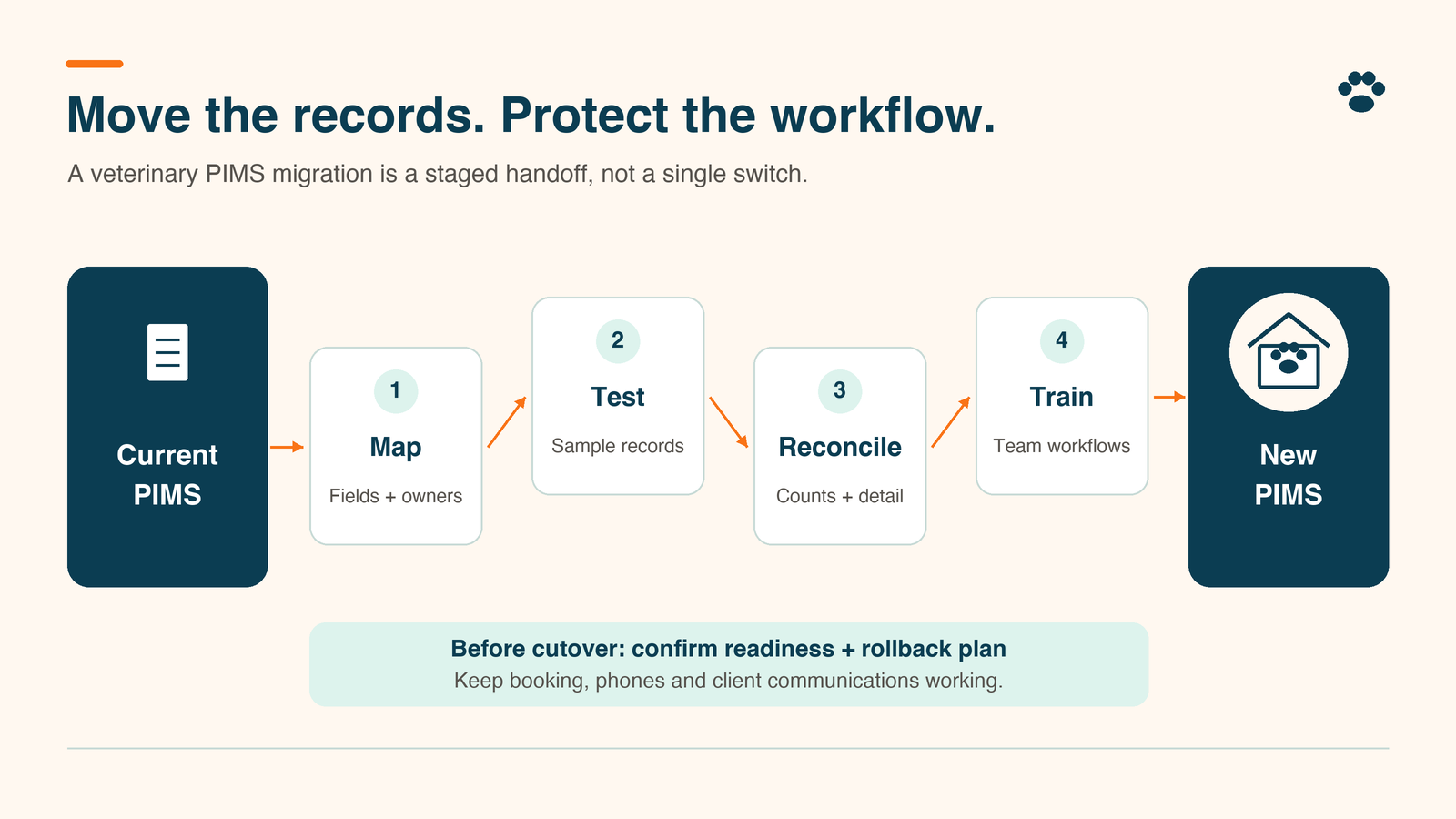
A veterinary PIMS migration checklist has to cover the work around the records: booking, client messages, checkout, staff permissions, and the handoffs between them. The first appointment on the new system is where any gap shows up, usually as an attachment that will not open or two systems sending the same reminder.
PIMS stands for practice information management system. For a practice owner or manager, readiness comes down to four things: a verified export, a tested trial conversion, staff acceptance, and a controlled cutover with a fallback. Moving the data is one part of moving the clinic’s work.
At TailWerks, our concern is the Search-to-Schedule path, every step between a pet owner’s search and a visit on the calendar. Keep database conversion with your technical team and vendors. Before cutover:
- Know what moves, what changes format, and what stays in an archive.
- Test records and complete workflows before approving cutover.
- Assign one owner to each failure, reconciliation, and go-live decision.
Does the problem require a new PIMS?
Start with the recurring failure. Write down the task, the current workaround, and the evidence that the proposed system handles it better. The replacement demo can wait until that is on paper.
If appointment requests disappear because nobody owns the inbox, changing databases does not fix that ownership gap. If a required workflow is unsupported in your current system, ask the incoming vendor to demonstrate it on your configuration before you commit.
Keep product selection separate from migration approval. Our veterinary practice-management software comparison covers the category. This checklist assumes you have picked a system and asks whether the transition is ready.
What belongs in your veterinary PIMS migration checklist?
Build one inventory with a row for each data type or connected service. Record its source, destination, responsible person, export format, validation method, and fallback location.
The inventory covers more than the database:
- Records: client and patient IDs, owner relationships, alerts, medical history, prescriptions, vaccination records, attachments and correspondence
- Schedule and money: future appointments, recalls, outstanding balances and deposits
- Configuration: inventory quantities, item codes, templates and user permissions
- Connected services, listed separately: laboratories, payment services, booking tools, reminder platforms and website forms
Some of it will not convert at all. ezyVet’s Cornerstone-to-ezyVet documentation excludes medical-note templates, correspondence templates, and existing report records from that conversion. Those limits apply to that documented route; every vendor pair has its own list, so get yours in writing.
Assign each row a disposition: converted, recreated, retained in a searchable archive or excluded with explicit approval. Review your retention obligations before anything historical gets deleted as cleanup.
Settle export responsibilities before the switch
Get written answers from both vendors before scheduling termination. Confirm:
- Export ownership
- Included tables and attachments
- Secure transfer method
- Charges and turnaround
- Correction rounds
- Access after cancellation
Ask the receiving team to validate a sample export. A file that downloads is only a file; the destination still has to import it correctly.
Pulse’s data conversion documentation puts the request on you when the source is a cloud system: the practice administrator contacts the outgoing vendor for a copy of the data and attachments. It warns that unsupported formats or missing required fields can extend processing, and for its automated pull method, attachments travel separately by sFTP and are processed by hand. Its sample timeline runs 63 days from first data pull to go-live, with the trial conversion ready around day 21 and the clinic’s verification due by day 35.
Put acceptance and error-reporting dates on the project calendar. Provet’s Terms of Service, effective September 17, 2026, give you five business days to report material errors in a test migration in writing, after which it is deemed accepted, and 14 days after go-live to report errors in the final migration. Corrections requested after that can be billed as additional professional services. Your own agreement will have its own windows. Have someone who reads contracts check them before you sign.
Test the trial conversion against real workflows
Validate against the source, with the old record open beside the new one. Build the sample from:
- Recent and older records
- Attachment-heavy histories
- Multi-pet households
- Inactive or deceased patients
- Outstanding balances
- Upcoming appointments
Expand the sample around known problem areas.
ezyVet’s validation procedures recommend a minimum of ten records per record type and require the checks to be completed while your data sits in the trial site, before the pre-go-live conversion. Treat ten as a vendor’s starting point. It does not prove completeness.
For each selected record, check ownership, identifiers, dates, status, alerts, notes, medications, reminders, financial history, and communications. Open attachments on the devices staff will use. Record the source value, destination result, defect owner, and retest outcome in a restricted-access log.
Format matters, and so does timing. ezyVet’s Cornerstone clinical data documentation says converted medical notes land in the Attachments section as RTF files, and IDEXX support recommends configuring devices to open RTF in a word editor. Those notes convert only in the post-go-live pass, and images only in the pre-go-live pass, so neither shows in the trial site. Test readability on a real workstation, and know which gaps in the trial are expected.
Compare total counts and financial control reports as well. A correct sample can miss a missing batch, and matching totals can hide wrong patient relationships.
Can staff complete the appointment without a workaround?
Have reception, a technician, a veterinarian, and the checkout lead perform their own tasks in the trial environment with their own permissions. Watching a trainer click through tells you the trainer can do it.
Run a booking through arrival, record retrieval, documentation, invoice, payment, and follow-up. Include a reschedule, a cancellation, a duplicate-name search, and an unavailable appointment slot. Use approved test contacts and the vendor’s payment-testing process so no real client gets a stray message or charge.
For veterinary client-communication tools, check conversation history, opt-outs, reply routing, pending reminders, and which system sends each message. Document any history that will stay accessible only in the old platform.
For veterinary online booking tools, test provider availability, appointment lengths, blocked slots, and new-client restrictions. Check website and Google Business Profile booking links. Make sure an appointment request never reads to the pet owner as a confirmed booking.
Five acceptance gates before go-live
Use the following five gates as a sign-off sheet. For every gate, record the named approver, evidence location, result, and any accepted exception with an owner and resolution date. These are operational acceptance criteria we propose; your vendor’s contract defines acceptance on its own terms, so hold both.
- Export gate (practice manager and technical lead). Retain a dated source backup and export manifest. Open representative files and get the receiving team’s confirmation that the format is usable. Stop if required records or attachments are missing without an approved retrieval path.
- Record gate (clinical lead). Complete the varied-record checks and retain count comparisons. Stop for unresolved wrong-owner links, unreadable required histories, or missing critical alerts. Log lower-priority discrepancies for correction and retest.
- Workflow gate (department leads). Staff complete the appointment journey under their own roles. Confirm booking rules, permissions, and message ownership. Stop if staff cannot retrieve required information or tell a request from a confirmed appointment.
- Cutover gate (migration lead). Approve the final extraction time, source-system write freeze, automation pause, downtime process, and fallback deadline. Confirm vendor support coverage. Stop if nobody can explain how work entered during downtime will reach the authoritative record.
- Reconciliation gate (manager and finance lead). Compare the first live schedule, balances, deposits, invoice totals, and payment postings against saved controls. Explain each variance. Keep the transition open until every discrepancy has an owner, a disposition, and a verified correction.
Plan cutover and fallback before committing
Choose a lower-demand window with trained staff and confirmed support availability. Publish an internal run sheet with times, contacts, and the person authorized to proceed or stop. Keep the old system accessible under agreed terms until validation and archive arrangements are complete.
Tell pet owners about any changed booking link, portal access or expected response delay. Give staff one approved explanation and a working contact alternative. Pause overlapping reminders deliberately, then verify the intended sender before resuming them.
Define rollback before launch:
- The trigger
- The decision deadline
- The source of truth
- The recovery sequence
Returning to the old login is not a rollback plan. Once staff create records or payments in the new system, capture and reconcile that work before any reversal, with technical support. Avoid uncoordinated entry in both systems.
Our Take
Migration readiness is a retrieval test, not an upload receipt. The useful question is whether your team can find the right information and finish the appointment after the vendor leaves the call.
Free migration can still leave substantial validation work with the clinic. At TailWerks, we treat acceptance as the clinic’s decision, supported by evidence, and the calendar date as the thing that moves. A delayed cutover with a documented defect is easier to defend than approving a transition nobody has tested.
Frequently Asked Questions
How long does a veterinary PIMS migration take?
Ask for a schedule built on your source system, data volume, attachment handling, trial corrections, and training. Pulse publishes a sample 63-day timeline and labels its processing times as estimates that shift with data quality and size. Another clinic’s timeline is a reference point, never your commitment.
Can a clinic switch PIMS midyear?
Yes, if the readiness checks pass. Preserve financial reports through the cutoff, define reporting periods and have the finance lead approve the opening balances and reconciliation method.
Does migration include every attachment and message?
Confirm the scope in writing and test it. Separate converted history, separately accessible archives, unreadable formats, and excluded data. Test pending messages independently from historical conversations.
When can we cancel the old system?
After export validation, final conversion, archive access, and reconciliation are done, and only once you have checked the notice period and the acceptance window in both contracts. Provet, for example, states it has no obligation to keep the data it pulled from your old system once its 14-day acceptance period ends.
Check the booking path before you send clients through it
Add the public appointment journey to your veterinary PIMS migration checklist. Booking links, forms and follow-up are where a clean migration still loses appointments.
Schedule a Search-to-Schedule Audit with TailWerks. We will look at where pet owners find you, where inquiries drop off, and which website, tracking, or booking link needs attention before go-live. Your migration team keeps the database; we check the path to it.